系统流程示意图
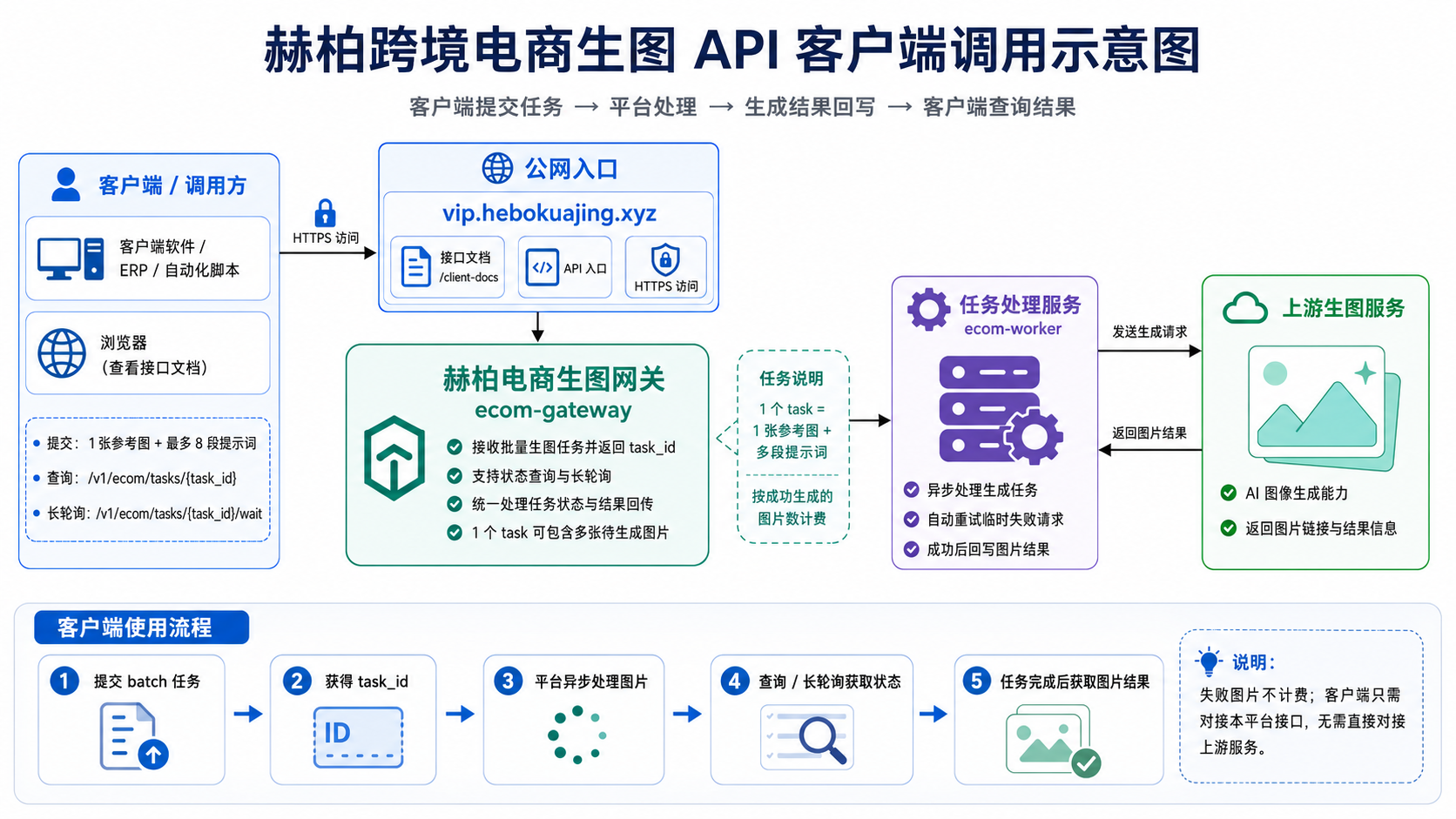
客户端只需要对接本平台接口:提交任务、获取 task_id、查询任务状态、下载生成结果。
生成任务由平台异步处理;失败图片不计费;普通本地客户端推荐使用长轮询获取结果。
代码块注释版示例
重要说明:本章节是“字段说明版”,用于帮助开发人员理解每个参数的作用。
正式请求时,JSON 里面不能带 // 注释。实际开发请复制“可直接复制版”的代码。
1. 查询当前额度
# 用途:
# 1. 客户端启动时查看当天剩余额度
# 2. 提交任务前判断是否还能生成图片
# 3. 显示当前套餐、每日图片额度、单任务最大图片数

curl -X GET "https://vip.hebokuajing.xyz/v1/ecom/quota" \
  -H "Authorization: Bearer sk-客户Token"
2. 创建批量生图任务:字段说明版
{
  // 产品参考图地址
  // 必须是公网可访问的 http/https 图片链接
  // 不支持 localhost、127.0.0.1、192.168.x.x 等本地或内网地址
  "image_url": "https://example.com/product.jpg",

  // 输出图片尺寸
  // 常用值:1024x1024
  "size": "1024x1024",

  // 图片比例
  // 常用值:1:1、3:4、4:3、9:16
  "aspect_ratio": "1:1",

  // 提示词数组
  // 1 条提示词 = 生成 1 张图片
  // 例如传 5 条提示词,就生成 5 张图片
  // 当前单个任务最多支持 8 张图片
  "prompts": [
    "第 1 张图提示词",
    "第 2 张图提示词",
    "第 3 张图提示词"
  ]
}
3. 创建批量生图任务:可直接复制版
curl -X POST "https://vip.hebokuajing.xyz/v1/ecom/batch" \
  -H "Authorization: Bearer sk-客户Token" \
  -H "Content-Type: application/json" \
  -d '{
    "image_url": "https://example.com/product.jpg",
    "size": "1024x1024",
    "aspect_ratio": "1:1",
    "prompts": [
      "Use the product image as exact reference. Create ecommerce image 1.",
      "Use the product image as exact reference. Create ecommerce image 2."
    ]
  }'
4. 查询任务结果:普通查询
# 用途:
# 根据 task_id 查询任务当前状态和图片结果
# 适合简单接入,也可以作为长轮询的兜底查询

curl -X GET "https://vip.hebokuajing.xyz/v1/ecom/tasks/ecom_xxx" \
  -H "Authorization: Bearer sk-客户Token"
5. 查询任务结果:长轮询推荐版
# 普通本地客户端推荐使用长轮询
# 好处:
# 1. 不需要客户电脑有公网地址
# 2. 比固定每几秒查询更省请求
# 3. 任务有变化会立即返回
# 4. 没变化最多等待 timeout 秒

# 第一次请求,不需要带 version
curl -X GET "https://vip.hebokuajing.xyz/v1/ecom/tasks/ecom_xxx/wait?timeout=25" \
  -H "Authorization: Bearer sk-客户Token"

# 第二次开始,把上一次返回的 wait.version 带回来
# 如果状态没变化,服务器会等待
# 如果有图片成功、失败、重试或任务结束,会立即返回
curl -X GET "https://vip.hebokuajing.xyz/v1/ecom/tasks/ecom_xxx/wait?timeout=25&version=上一轮返回的version" \
  -H "Authorization: Bearer sk-客户Token"
6. 任务结果字段说明
{
  // 批量任务 ID
  // 后续查询任务状态都使用这个 ID
  "task_id": "ecom_xxx",

  // 任务状态
  // queued:排队中
  // processing:生成中
  // completed:全部成功
  // partial:部分成功
  // failed:全部失败
  "status": "completed",

  // 本次任务总图片数
  "total": 8,

  // 成功图片数
  "success_count": 8,

  // 失败图片数
  "failed_count": 0,

  // 成功结果数组
  "results": [
    {
      // 当前图片序号,对应 prompts 里的顺序
      "index": 1,

      // 当前图片状态
      "status": "success",

      // 生成完成后的图片链接
      "image_url": "https://..."
    }
  ],

  // 失败图片数组
  // 如果某张图失败,会在这里返回失败原因
  "failed_items": []
}
7. 额度不足错误示例
{
  // 表示今天的免费图片额度已经用完
  "message": "今日免费图片额度不足",

  // 当前套餐等级
  "level": "vip1",

  // 每日图片额度
  "daily_limit": 40,

  // 今日已使用图片数
  "used": 40,

  // 今日剩余图片数
  "remaining": 0,

  // 本次请求需要生成的图片数
  "requested": 1
}
8. 客户端推荐接入流程
# 推荐接入流程:
# 1. 调用 /v1/ecom/quota 查询剩余额度
# 2. 如果 remaining_images 不足,不提交任务
# 3. 调用 /v1/ecom/batch 创建任务
# 4. 保存返回的 task_id
# 5. 使用 /v1/ecom/tasks/{task_id}/wait?timeout=25 长轮询
# 6. status 为 completed / partial / failed 后停止查询
# 7. completed:下载 results 里的 image_url
# 8. partial:下载成功图片,同时提示失败图片原因
# 9. failed:显示失败原因
# 10. 如果接口返回 429,按 retry_after 等待后再请求
普通客户端推荐:长轮询查询任务
普通本地客户端推荐使用长轮询接口,不需要公网 callback_url。
服务器最多等待 30 秒;如果任务状态有变化,会立即返回。
GET /v1/ecom/tasks/{task_id}/wait?timeout=25
Authorization: Bearer sk-客户Token
第一次请求
GET /v1/ecom/tasks/ecom_xxx/wait?timeout=25返回中会包含 wait.version:
{
  "task_id": "ecom_xxx",
  "status": "processing",
  "success_count": 3,
  "failed_count": 0,
  "wait": {
    "success": true,
    "version": "processing|3|0|0|...",
    "changed": true,
    "timeout_seconds": 25,
    "waited_seconds": 0
  }
}
后续请求带上 version
GET /v1/ecom/tasks/ecom_xxx/wait?timeout=25&version=processing%7C3%7C0%7C0...如果状态没变化,服务器会等待;如果有图片完成、失败、重试或任务结束,会立即返回。
客户端推荐逻辑
1. POST /v1/ecom/batch 创建任务
2. 保存返回的 task_id
3. 调用 /v1/ecom/tasks/{task_id}/wait?timeout=25
4. 保存 wait.version
5. 下一次请求带上 version
6. status 为 completed / partial / failed 后停止查询
7. 如果返回 429,按 retry_after 等待后再查
普通本地客户端不要使用 Webhook 作为主流程,因为客户电脑通常没有公网 HTTPS 地址。Webhook 更适合有自己服务器的客户。
任务与计费单位说明
1 个批量任务 task = 客户上传 1 张参考图 + 提交多段提示词 + 系统生成多张图片。
计费单位不是 task,而是 image / item,也就是单张成功生成的图片。
例如:1 张参考图 + 8 段提示词 = 1 个 task,里面包含 8 个 image item。成功 8 张扣 8 张图片额度;如果成功 6 张、失败 2 张,则只扣 6 张图片额度,失败 2 张会退回额度。
{
  "task_unit": "batch_task",
  "image_unit": "image",
  "billing_unit": "successful_image",
  "max_images_per_task": 8,
  "example": "1 reference image + 8 prompts = 1 task with 8 generated images"
}
VIP1 每日免费图片额度
VIP1 每天包含 40 张免费成功图片额度。
免费额度按 成功生成的图片 image / item 计算,不按 task 计算。
例如:客户提交 1 个批量 task,里面有 8 段提示词,最终成功生成 8 张图,则占用 8 张免费图片额度。
| 情况 | 额度处理 | 是否写入客户扣费账单 |
|---|---|---|
| VIP1 当天第 1–40 张成功图 | 占用每日免费图片额度 | 不写入 平台后台 客户扣费账单 |
| VIP1 当天第 41 张及以后成功图 | 超出免费额度 | 写入 平台后台 客户扣费账单 |
| 生成失败的图片 | 退回图片额度 | 不扣费 |
{
  "unit": "image",
  "task_unit": "batch_task",
  "billing_unit": "successful_image",
  "daily_image_limit": 40,
  "max_images_per_task": 8,
  "free_included_images_vip1": 40,
  "example": "1 reference image + 8 prompts = 1 task, success 8 images consumes 8 free image quota"
}
长尾任务保护说明
图片生成任务可能因为上游繁忙、HTTP 500、HTTP 422、系统重试等原因出现长尾。
这不代表整个任务卡死。客户端应该根据 success_images、active_items、slow_items 展示进度。
当 8 张图中已有 7 张成功,只剩 1 张仍在重试时,客户端应提示:剩余 1 张正在生成或重试中。
| 字段 | 说明 |
|---|---|
total_images |
当前批量任务总图片数 |
success_images |
已经成功生成的图片数 |
failed_images |
最终失败的图片数 |
active_items |
仍在排队、生成、重试中的图片 item |
slow_items |
重试次数较多或耗时较长的图片 item |
long_tail_protection |
长尾保护状态与慢任务数量 |
{
  "status": "processing",
  "total_images": 8,
  "success_images": 7,
  "failed_images": 0,
  "long_tail_protection": {
    "enabled": true,
    "threshold_seconds": 300,
    "active_count": 1,
    "slow_count": 1,
    "message": "Some images may still be generating or retrying. The whole task is not stuck if success_images is still increasing."
  },
  "slow_items": [
    {
      "index": 6,
      "status": "retrying",
      "retry_count": 4,
      "age_seconds": 420,
      "next_retry_at": 1783189000
    }
  ]
}
客户端不要因为 task 还在 processing 就判断失败。只有接口返回 failed、partial 或最终失败 item 时,才算对应图片失败。
目录
系统流程示意图 代码块注释版示例 长轮询查询任务 VIP1 每日免费图片额度 长尾任务保护说明 任务与计费单位说明 基础信息 鉴权方式 提交生成任务 查询任务状态 任务状态说明 轮询频率限制 失败重试 计费与退款 额度查询 客户端示例 错误处理1. 基础信息
| 项目 | 说明 |
|---|---|
| 接口域名 | https://vip.hebokuajing.xyz |
| 数据格式 | 请求和响应均使用 JSON |
| 鉴权方式 | HTTP Header 中传入 Authorization: Bearer YOUR_API_KEY |
| 任务模式 | 异步任务。提交后返回 task_id,客户端轮询查询结果。 |
| 计费规则 | 成功生成才扣费。最终失败会退回预占额度。 |
2. 鉴权方式
所有接口都需要在请求头中携带 API Key:
Authorization: Bearer YOUR_API_KEY
Content-Type: application/json3. 提交图片生成任务
接口地址
POST /v1/ecom/batch完整地址
https://vip.hebokuajing.xyz/v1/ecom/batch请求参数
| 字段 | 类型 | 是否必填 | 说明 |
|---|---|---|---|
| image_url | string | 是 | 产品图片 URL,必须是公网可访问地址。 |
| model | string | 否 | 模型名称,默认可使用 gpt-image-2-1k。 |
| size | string | 否 | 请求尺寸,例如 1024x1024。 |
| aspect_ratio | string | 否 | 图片比例,例如 1:1、3:4、4:3。 |
| prompts | array<string> | 是 | 提示词数组。每条提示词生成一张图片。 |
比例说明
| aspect_ratio | 实际生成方向 | 说明 |
|---|---|---|
| 1:1 | 方图 | 适合主图、商品展示图。 |
| 3:4 / 2:3 / 9:16 | 竖图 | 适合电商广告图、竖版海报。 |
| 4:3 / 3:2 / 16:9 | 横图 | 适合横版广告、Banner。 |
请求示例
curl -X POST "https://vip.hebokuajing.xyz/v1/ecom/batch" \
  -H "Authorization: Bearer YOUR_API_KEY" \
  -H "Content-Type: application/json" \
  -d '{
    "image_url": "https://example.com/product.jpg",
    "model": "gpt-image-2-1k",
    "size": "1024x1024",
    "aspect_ratio": "3:4",
    "prompts": [
      "Use this product image as exact reference. Create a premium ecommerce vertical poster."
    ]
  }'
成功响应示例
{
  "success": true,
  "task_id": "ecom_1783178612_7256b0ad0b",
  "job_id": "ecom_1783178612_7256b0ad0b",
  "status": "queued",
  "total": 1,
  "aspect_ratio": "3:4",
  "message": "任务已进入队列",
  "poll_url": "/v1/ecom/tasks/ecom_1783178612_7256b0ad0b",
  "quota": {
    "enabled": true,
    "level": "vip1",
    "daily_limit / daily_image_limit": 40,
    "used_before": 3,
    "reserved / reserved_images": 1,
    "used_after": 4,
    "remaining / remaining_images": 36
  }
}task_id,后续通过查询接口获取任务状态。
4. 查询任务状态
接口地址
GET /v1/ecom/tasks/{task_id}请求示例
curl "https://vip.hebokuajing.xyz/v1/ecom/tasks/ecom_1783178612_7256b0ad0b" \
  -H "Authorization: Bearer YOUR_API_KEY"
生成中响应示例
{
  "task_id": "ecom_xxx",
  "status": "processing",
  "success_count": 0,
  "failed_count": 0,
  "processing_count": 1,
  "items": [
    {
      "task_id": "item_xxx",
      "status": "processing",
      "retry_count": 0,
      "max_retries": 6,
      "manual_retry_allowed": false
    }
  ]
}
成功响应示例
{
  "task_id": "ecom_xxx",
  "status": "completed",
  "success_count": 1,
  "failed_count": 0,
  "results": [
    {
      "task_id": "item_xxx",
      "status": "success",
      "image_url": "https://image.example.com/result.png",
      "retry_count": 0
    }
  ],
  "quota": {
    "reserved / reserved_images": 1,
    "billable": 1,
    "refunded": 0
  }
}
失败响应示例
{
  "task_id": "ecom_xxx",
  "status": "failed",
  "success_count": 0,
  "failed_count": 1,
  "failed_items": [
    {
      "task_id": "item_xxx",
      "status": "failed",
      "retry_count": 6,
      "max_retries": 6,
      "retryable": true,
      "manual_retry_allowed": true,
      "error_message": "HTTP 500: system error"
    }
  ],
  "quota": {
    "reserved / reserved_images": 1,
    "billable": 0,
    "refunded": 1
  }
}
5. 任务状态说明
| 状态 | 说明 | 客户端行为 |
|---|---|---|
| queued | 任务已进入队列,等待处理。 | 继续轮询。 |
| processing | 任务正在处理。 | 继续轮询。 |
| retrying | 任务失败后正在自动重试。 | 继续轮询,不要手动重试。 |
| completed | 任务全部成功。 | 停止轮询,展示图片。 |
| failed | 任务最终失败。 | 停止轮询,可显示重试按钮。 |
| partial_failed | 部分成功,部分失败。 | 展示成功图片,并允许重试失败项。 |
6. 轮询频率限制
为避免客户端过于频繁查询任务状态,服务端对轮询做了频率限制。
| 任务创建后时间 | 最小查询间隔 |
|---|---|
| 0 - 30 秒 | 最少 5 秒查一次 |
| 30 - 180 秒 | 最少 10 秒查一次 |
| 180 秒以后 | 最少 20 秒查一次 |
| completed / failed 后 | 客户端应停止轮询。如继续查询,最少 10 秒一次。 |
单个任务最多允许:
- 1 小时内最多查询 200 次。
- 任务超过 1 小时还未结束时,服务端会限制高频查询。
查询太频繁时的响应
HTTP/1.1 429 Too Many Requests
Retry-After: 5

{
  "detail": "Polling too frequently",
  "task_id": "ecom_xxx",
  "status": "processing",
  "min_interval": 5,
  "retry_after": 5
}retry_after 秒,再继续查询同一个 task_id。不要重新提交任务。
7. 失败重试
任务最终失败后,如果失败项里有 manual_retry_allowed: true,客户端可以显示“重新生成”按钮。
重试接口
POST /v1/ecom/tasks/{原始task_id}/retry-items请求示例
curl -X POST "https://vip.hebokuajing.xyz/v1/ecom/tasks/ecom_xxx/retry-items" \
  -H "Authorization: Bearer YOUR_API_KEY" \
  -H "Content-Type: application/json" \
  -d '{
    "task_ids": ["item_xxx"]
  }'
响应示例
{
  "success": true,
  "parent_task_id": "ecom_xxx",
  "retry_task_id": "ecom_retry_xxx",
  "retry_job_id": "ecom_retry_xxx",
  "status": "queued",
  "total_retry_items": 1
}retry_task_id,不要继续轮询旧任务等待新结果。
8. 计费与退款规则
| 情况 | 是否扣费 | 说明 |
|---|---|---|
| 任务提交成功 | 预占额度 | 系统会先预占对应图片数量的额度。 |
| 图片生成成功 | 扣费 | 只按成功生成的图片扣费。 |
| 自动重试中 | 不重复扣费 | 自动重试次数不额外扣费。 |
| 最终失败 | 不扣费 | 预占额度会退回。 |
| 手动重试成功 | 扣费 | 重试任务成功后正常扣费。 |
| 手动重试失败 | 不扣费 | 重试任务失败后预占额度退回。 |
quota.billable 和 quota.refunded 展示本次任务是否扣费。
9. 额度查询
查询当前额度
GET /v1/ecom/quota请求示例
curl "https://vip.hebokuajing.xyz/v1/ecom/quota" \
  -H "Authorization: Bearer YOUR_API_KEY"
响应示例
{
  "user_id": "3",
  "quota": {
    "enabled": true,
    "level": "vip1",
    "daily_limit / daily_image_limit": 40,
    "used": 4,
    "remaining / remaining_images": 36
  }
}
10. 客户端 JavaScript 示例
提交任务
async function createImageTask(apiKey, imageUrl, prompt) {
  const res = await fetch("https://vip.hebokuajing.xyz/v1/ecom/batch", {
    method: "POST",
    headers: {
      "Authorization": `Bearer ${apiKey}`,
      "Content-Type": "application/json"
    },
    body: JSON.stringify({
      image_url: imageUrl,
      model: "gpt-image-2-1k",
      size: "1024x1024",
      aspect_ratio: "3:4",
      prompts: [prompt]
    })
  });

  const data = await res.json();

  if (!res.ok) {
    throw new Error(data.detail || "Create task failed");
  }

  return data.task_id;
}
轮询任务
function sleep(ms) {
  return new Promise(resolve => setTimeout(resolve, ms));
}

async function pollTask(apiKey, taskId) {
  const start = Date.now();

  while (true) {
    const res = await fetch(`https://vip.hebokuajing.xyz/v1/ecom/tasks/${taskId}`, {
      headers: {
        "Authorization": `Bearer ${apiKey}`
      }
    });

    if (res.status === 429) {
      let retryAfter = Number(res.headers.get("Retry-After")) || 20;

      try {
        const data = await res.json();
        retryAfter = data.retry_after || retryAfter;
      } catch (e) {}

      await sleep(retryAfter * 1000);
      continue;
    }

    const data = await res.json();

    if (data.status === "completed") {
      return {
        status: "completed",
        images: data.results || [],
        task: data
      };
    }

    if (data.status === "failed") {
      return {
        status: "failed",
        failed_items: data.failed_items || [],
        task: data
      };
    }

    if (data.status === "partial_failed") {
      return {
        status: "partial_failed",
        success_items: (data.results || []).filter(x => x.status === "success"),
        failed_items: data.failed_items || [],
        task: data
      };
    }

    const age = (Date.now() - start) / 1000;

    let delay = 20000;

    if (age <= 30) {
      delay = 5000;
    } else if (age <= 180) {
      delay = 10000;
    } else {
      delay = 20000;
    }

    await sleep(delay);
  }
}
重试失败项
async function retryFailedItems(apiKey, originalTaskId, failedItems) {
  const itemIds = failedItems
    .filter(item => item.manual_retry_allowed)
    .map(item => item.task_id);

  if (itemIds.length === 0) {
    throw new Error("No retryable items");
  }

  const res = await fetch(`https://vip.hebokuajing.xyz/v1/ecom/tasks/${originalTaskId}/retry-items`, {
    method: "POST",
    headers: {
      "Authorization": `Bearer ${apiKey}`,
      "Content-Type": "application/json"
    },
    body: JSON.stringify({
      task_ids: itemIds
    })
  });

  const data = await res.json();

  if (!res.ok) {
    throw new Error(data.detail || "Retry failed");
  }

  return data.retry_task_id;
}
11. 常见错误处理
| HTTP 状态 | 含义 | 客户端处理方式 |
|---|---|---|
| 200 | 请求成功 | 读取 JSON 中的 status 判断任务状态。 |
| 400 | 请求参数错误 | 检查 image_url、prompts、aspect_ratio 等参数。 |
| 401 / 403 | API Key 无效或无权限 | 检查 Authorization Header。 |
| 429 | 查询太频繁 | 读取 retry_after,等待后继续查询同一个 task_id。 |
| 500 | 服务异常 | 稍后重试请求;不要短时间高频重复提交。 |
status=failed 为准,不要把 HTTP 429 当成任务失败。